What changed
- Existing Levels Pro owners now receive separate NinjaTrader and Quantower downloads in My Account.
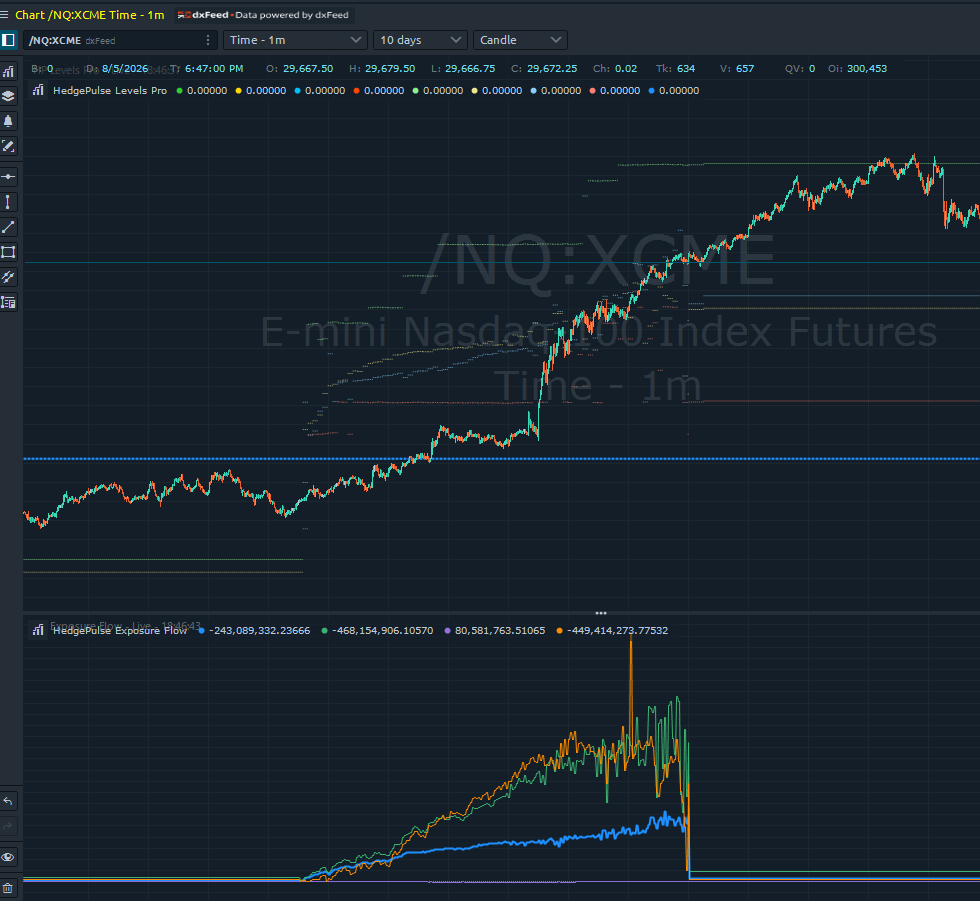
- The Quantower package plots historical PG, ZG, GF, and NG levels as independent horizontal time segments with live traded-volume levels and expected-move bands.
- Line color, width, and style can be adjusted in Quantower, including the expected-move bands.
- Add the Exposure Flow indicator for a lower panel containing GEX, DEX, VEX, and CEX with open-interest or traded-volume basis.
- Matching Levels Pro and Exposure Flow settings share one bounded 60-second-or-longer request cadence.
Access and installation
Quantower is included with the existing Levels Pro product. It does not require another purchase or another runtime key. Download the Quantower package from My Account, close Quantower, copy the included DLL into the active Settings\Scripts\Indicators\HedgePulse folder, and restart the platform.
Levels Pro continues to require product ownership, an active Elite subscription, and a valid Levels Pro account email/runtime key for live data.